Your business needs a content management system (CMS), a customer relationship management (CRM) software and marketing automation tools. They are each essential pieces of a marketing tech stack.
A CMS allows you to streamline website content updates. For instance, if you want to update your blog, a CMS provides a template. You won’t need to code a new web page from the ground up to create a new post.
A CRM lets you manage your database of contacts with ease, tracking where individuals enter and how they progress through your sales pipeline. It’s also useful for determining what sales tactics are most successful.
Marketing automation helps you create and measure the success of workflows more efficiently. It allows you to create email campaigns, develop landing pages, segment your audience, personalize content, generate leads and much more. From there, you can arrange and connect everything to guide contacts through your funnel.
Many people look to market leaders in each of these categories to form the basis of their tech stack. Today, the majority of websites are built on WordPress because it is the most versatile and trusted CMS. Many people use Salesforce as their CRM because it’s reliable, easy-to-use and maintains a whole ecosystem of integrations. Finally, businesses use HubSpot for marketing automation because it’s user-friendly, has a wide range of options and connects marketing, sales and services effectively.
To use these platforms together, though, you need to integrate them. Here’s how to integrate WordPress, HubSpot and Salesforce.

Connecting HubSpot, Salesforce and WordPress
Step 1: Connect WordPress to HubSpot
You can connect WordPress to HubSpot through the HubSpot All-In-One Marketing — Forms, Popups, Live Chat plugin. To do so, you need to visit the WordPress admin dashboard, find the “Plugins” menu in the left sidebar and click “Add New.” For full step by step instructions on how to install the plugin, visit HubSpot Academy.
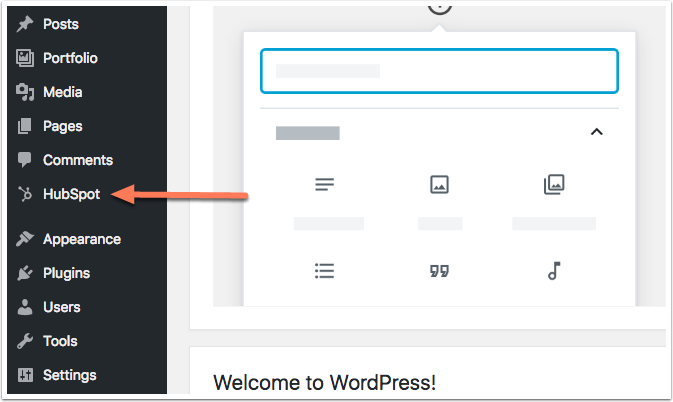
Step 2: Embed HubSpot forms on your WordPress site
Once this plugin is in place, you can embed HubSpot forms on your WordPress site. The forms will work as if they were natively hosted. When a lead is created from a form, they’ll be entered into your HubSpot database.
Step 3: Connect HubSpot to Salesforce
If you integrate your HubSpot and Salesforce accounts, you can directly transfer the information collected from WordPress on HubSpot to Salesforce.
Once someone fills out a HubSpot form on your WordPress site, it’s captured on HubSpot. By connecting your HubSpot and Salesforce accounts, you can transfer that information so it lives in both places.
Step 3.1 Find the Salesforce integration
While setting up the Salesforce integration may appear to be tedious and time-consuming, it’s definitely worth it. It will require ongoing management for any updates or errors that arise, but the integration will alleviate technical debt (the implicit cost of added rework caused by choosing a limited solution now over a superior approach that would take longer to implement).
To find and manage the HubSpot to Salesforce integration, go to your HubSpot homepage and click the gear in the upper right-hand corner.
-1-1.png?width=817&name=unnamed%20(1)-1-1.png)
Under Settings, click the Integrations drop-down and select Apps.
-1.png?width=194&name=unnamed%20(6)-1.png)
From the Apps screen, type Salesforce into the search bar; the Salesforce integration should show up. Here, you can connect your HubSpot and Salesforce accounts.
.png)
Step 3.2 Manage the Salesforce Integration
Click on the Salesforce logo. From there, you can manage the integration. If you scroll down under “Sync Settings,” you will see “CRM Objects.” Here, all of the HubSpot objects are listed with their Salesforce equivalents. For instance, companies are called “Accounts” in Salesforce.
.png)
If you click “Manage mappings,” it will show you the HubSpot properties and their related Salesforce fields. Here, you can analyze if there are any issues with the integration, manage the existing field mappings or add new field mappings if you wish.
.png)
At New Breed, we try to ensure that everything living in Salesforce also lives in HubSpot and vice versa. That doesn’t need to be the case, but it can make future migrations or integrations much easier.
Under “Contact Field Mappings,” you can also manage which values are prioritized after updates on each platform. Consider an individual that fills out a HubSpot form embedded on a WordPress page. That individual’s information is entered into HubSpot and transferred to Salesforce.
On the form, if they entered their city as “Phoenix” and a sales rep goes into Salesforce and updates that field to “Dallas,” you can program the integration to use the most recent value, “Dallas,” on both platforms.
Even though the rep only made the update on Salesforce, if the “Update Rule” (as is shown in the picture above) states, “Use most recent value,” both HubSpot and Salesforce will use, “Dallas,” as the city. You can change these rules so they accomplish what you want.
A Case for a Simpler Stack
At New Breed, we predominantly use HubSpot, but we use Salesforce as a supplementary tool because of Salesforce’s proposal management tools. For instance, we use an integration called Conga Collaborate to create, share and sign sales proposals, quotes and invoices.
If you plan on using both Salesforce and HubSpot, having information live on both platforms is beneficial, especially for reporting purposes.
With that said, we’ve observed that HubSpot has been adding features and functionality to compete with Salesforce’s CRM. We’re operating under the assumption that HubSpot will continue investing in their software and over time continue to increase its parity with Salesforce.
HubSpot is also competing with WordPress and both CMS’s have strengths and weaknesses.
HubSpot is a closed-source platform, so users can’t access and edit code for the site. If HubSpot crashes, your site crashes, and you have to wait until they solve the issue before you get back online.
Alternatively, WordPress is open-source and garners a large community of developers who use it. If something goes wrong, there’s an entire community working towards a solution. Over time, with all of the developers optimizing the code, it’s become very stable.
WordPress does offer more from a design and customization perspective. It also has a few integrations with SEO tools, like Yoast, that allow marketers to collect useful insights. That being said, HubSpot’s native SEO features perform well. They also maintain an edge in terms of user-friendliness.
Conversion features
Where HubSpot really shines, though, is with their conversion features. Since it grew from a marketing automation platform, HubSpot’s whole business model is centered on generating contacts. Their goal is to make a frictionless consumer experience. They have native forms, lead forms, slide-in CTAs, native CTAs, smart content, a chatbot feature — all of it is relevant, easy to use and helps fuel more conversions.
On WordPress, there are actually more options to try to optimize conversions, but it makes the process far more tedious. You spend time choosing between gravity forms, ninja forms and other features. It’s simply not as streamlined, intuitive or efficient as HubSpot.
Beyond that, HubSpot provides a more powerful platform than just a marketing automation software. Sure, that’s how it started, but it’s far more now. With HubSpot, your marketing automation can live with your website, your information can be in one place, your reporting can be centralized and with a simple click, you can access your entire CRM.
Key Takeaway
By leveraging the HubSpot and WordPress plugin, you can embed HubSpot forms on a WordPress site, capturing information. With the HubSpot and Salesforce integration, you can transfer that information from HubSpot to Salesforce. In this way, you can capture leads in HubSpot and Salesforce using WordPress.
However, there’s a simpler option: moving your company entirely onto HubSpot.
By harnessing its all-on-one capability, you won’t have to simultaneously open WordPress and HubSpot to embed forms and ensure they’re working properly. You won’t have to revert to Salesforce to manage your contacts. Everything lives on one comprehensive platform.
You can save time, money and integrations by centralizing your business on HubSpot.

This post was originally published on May 24, 2012.